
Search-based targeting
Build a campaign from any people search, company page, group or event list.
Leads Ranger runs a genuine LinkedIn campaign from inside your own browser: it picks the right people out of a search, sends connection requests with a note that reads like you wrote it, notices who accepted, and follows up. You approve the plan; it does the clicking.
Free during the open pilot
No credit card required
Every feature included


Open any LinkedIn people search, a company page, an event attendee list or a group, and the campaign reads the results the way you do: one card, one human. It does not confuse a "shared connections: Bob, Carla" line with two more prospects, which is exactly how naive scrapers quietly drop half a page of results and leave you wondering why your list came up short.
Filter to the roles, seniority and locations you actually sell to, then review the shortlist before a single invitation goes anywhere. Nothing is sent from a list you have not seen.
Works from people search, company pages, groups and event lists
Structural card detection: no missed profiles, no phantom ones
You review and trim the target list before anything sends
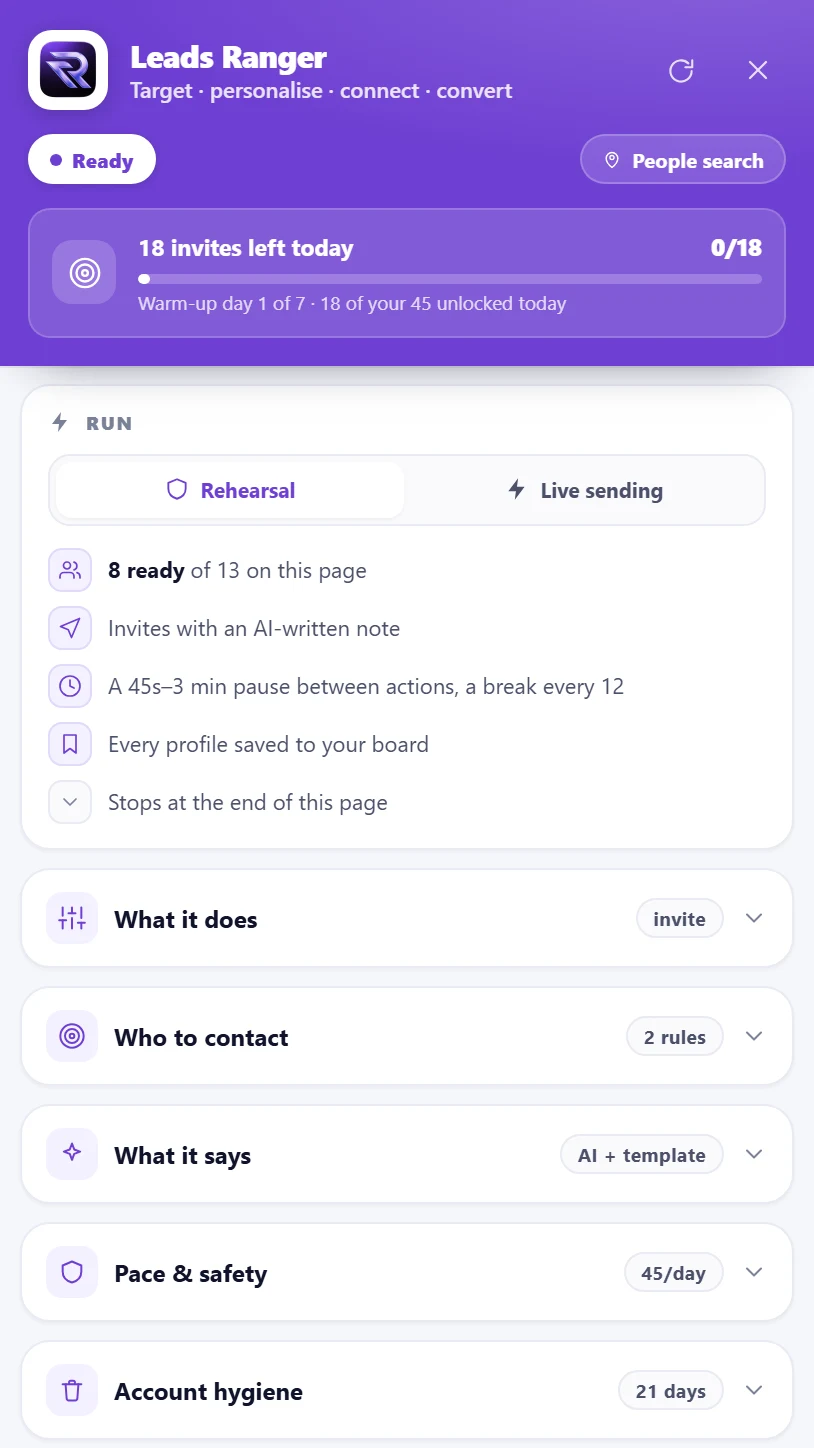
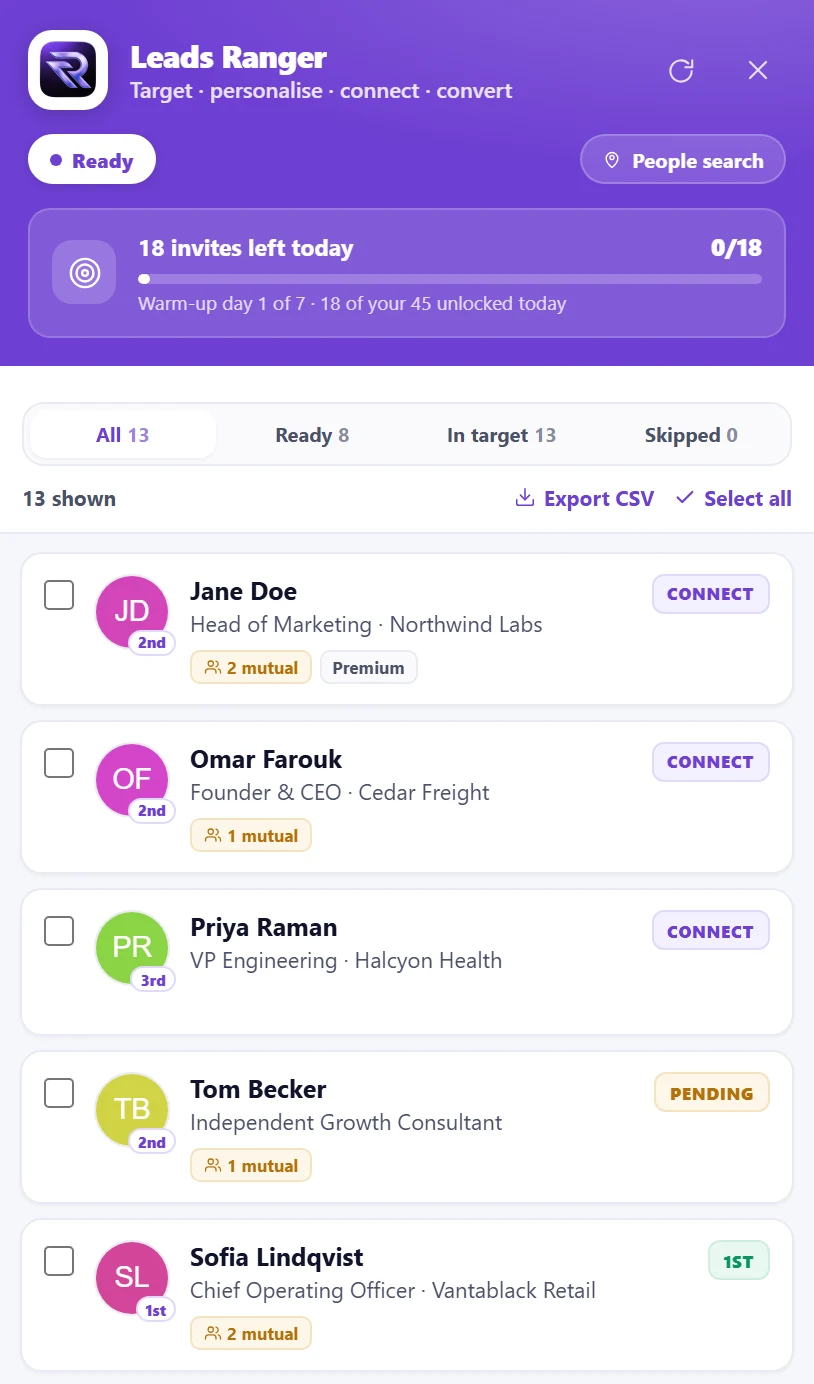
Most LinkedIn tools stop at the connection request, which is where the conversation has not started yet. Leads Ranger treats the invite as step one: it writes a personal note from your template and their real details, watches for the acceptance, and sends your follow-up on the schedule you set.
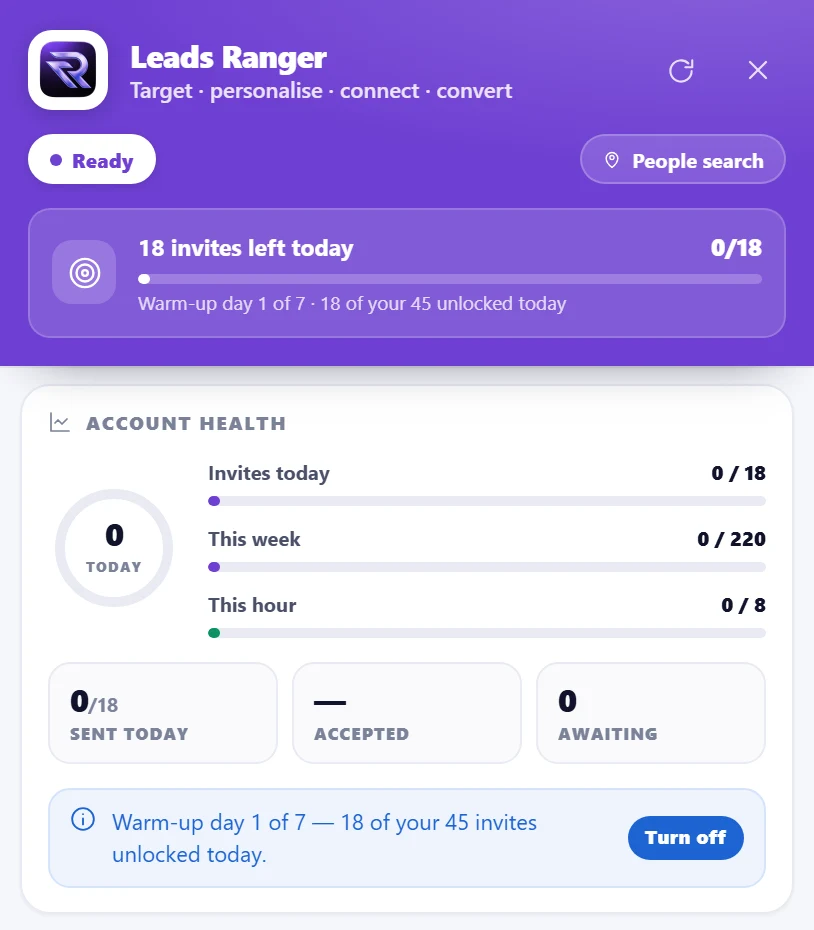
Every send is spaced with human-looking gaps, capped by a daily budget you choose, and paused the moment someone replies. Because the whole campaign runs in your own browser session, there is no password to hand over and no third-party server logging into your account.
Campaign: Manchester operations leads
1. Connection request
day 0Personal note, merged from their role and company
2. Accepted
day 2Detected automatically, no manual checking
3. Opening message
day 3Sent the morning after they accept
4. One nudge, then stop
day 8Silence after two touches is an answer
Turn on rehearsal mode and the campaign runs end to end against your real targets, writing every message it would send and logging every action it would take, while sending precisely zero invitations. It is the difference between hoping your template is right and knowing it.
A permanent record of who has been contacted means nobody is ever invited twice, not after a browser restart, not next quarter, not from a different campaign. Stale invitations that were never accepted can be withdrawn in a batch, which keeps your pending list inside LinkedIn’s own comfort zone.
Rehearsal mode: full dry run, nothing sent
Daily caps and pacing you set, enforced automatically
Nobody is ever contacted twice, across every campaign
Batch withdrawal of invitations that went unanswered
Included with the browser extension on paid plans. No separate LinkedIn tool, no second subscription, no credentials to hand over.
Build a campaign from any people search, company page, group or event list.
Connection notes merged from each person’s real role and company, not a generic blast.
Acceptances are spotted automatically and your opening message goes out on schedule.
Run the entire campaign with sending disabled and read every message before it is real.
Set your own ceiling and the campaign holds to it, with human-looking gaps between actions.
A permanent contact record means no prospect is ever invited or messaged twice.
Withdraw stale pending invites in a batch to keep your outstanding list healthy.
LinkedIn contacts become leads in the same workspace as your email and WhatsApp outreach.
0
passwords handed over: it runs in your own session
3 browsers
supported: Chrome, Firefox and Edge
1 rehearsal
is all it takes to see every message before it sends
One extension, three browsers, the same pipeline. Free on every plan while we are in pilot.
Safety comes from restraint, not from cleverness. Leads Ranger runs inside your own browser session rather than logging into your account from a data centre, spaces its actions with human-scale gaps, holds to a daily ceiling you set yourself, and never contacts the same person twice. Those four things are what separates a campaign that looks like a busy person from one that looks like a bot. You should still treat LinkedIn’s User Agreement as the rule that governs your account, keep volumes modest, and start with rehearsal mode.
LinkedIn does not publish a fixed number, and the practical ceiling depends on your account’s age, history and acceptance rate. Most experienced operators stay well under 100 invitations a week for a newer account and raise it slowly. Leads Ranger lets you set the daily cap yourself and enforces it, so you can start deliberately low and increase it only when your acceptance rate says you have earned the room.
No. Campaigns build from ordinary LinkedIn searches and pages, so a free account works. If you already pay for Sales Navigator, its richer filters make your target lists better, but nothing here requires it.
Rehearsal mode runs the whole campaign against your real target list and produces every message it would have sent, without sending any of them. One badly worded template sent to 200 people is not something you can take back, so a rehearsal that costs you five minutes is the cheapest insurance in outbound. Rehearsal state is kept completely separate from live state: a dry run can never be mistaken later for real outreach.
They run as their own campaign in the extension rather than as a step inside the email sequence builder, and the two share one pipeline: someone you connect with on LinkedIn is the same lead record as the one your email sequence is working, so you never double-tap a prospect from two channels by accident. If you need LinkedIn touches interleaved inside a single automated cadence with email, that is worth knowing before you choose us.
Chrome, Firefox and Edge. The Firefox add-on and the Microsoft Edge add-on are both published and installable today; the Chrome listing is in store review and will appear on the extension page as soon as it is approved.
No, and that is deliberate. The campaign uses your own browser session, so it runs while your browser is open and stops when it is not. Nothing about your account lives on our servers, which is the trade we chose: less unattended throughput, far less risk to the account you cannot replace.
An honest answer on LinkedIn automation risk: what LinkedIn’s rules say, the behaviours that really trigger restrictions, why cloud tools and browser tools carry different risk, and the settings that keep an account healthy.
Read the guide→Guide · 9 min readA practical setup for automated LinkedIn invitations and follow-ups: building the target search, writing the note, daily limits and ramp, detecting acceptances, follow-up messages and cleaning up pending invites.
Read the guide→Guide · 9 min readWhat LinkedIn actually restricts, why the famous "100 per week" number is only half true, how accounts really get restricted, and the volumes that keep you out of trouble.
Read the guide→Guide · 11 min readA practical buyer guide to LinkedIn automation: the two architectures, the five features that matter, the ones that are marketing, and how to evaluate a tool without risking the account you cannot replace.
Read the guide→LinkedIn Outreach & Automation hits harder when the whole platform fights beside it. Explore what else ships with it.
Email and WhatsApp in one thread view, with pipeline stages and deal values built in.
Explore inbox & crm→Turn any directory, listing site or LinkedIn page into pipeline while you browse.
Explore extension→Email, WhatsApp and LinkedIn working one pipeline, so the same person is never chased twice.
Explore multichannel outreach→Install the extension, build a campaign from a search you already run, and watch the whole thing play out before a single invitation is real.